Part 1: Blog Tech Stack
Scribbles,,,
I just needed a space to jot things down.
Nothing grandiose. I wanted to organize what I studied somewhere and have a place to revisit later. I considered Tistory and briefly looked at Velog, but then I thought building one myself could be a learning experience too. So I went with a GitHub blog.
When I searched for ways to build one, there were so many options out there. Jekyll, Hugo, Gatsby, Astro... Too many choices actually made it harder to decide, but in the end I went with Next.js + GitHub Pages since that's what I'm most familiar with. Familiar is best.
It took a few days to finish the blog, and honestly the process wasn't smooth at all. Things I thought would work didn't, and things I thought wouldn't work somehow did. Here's a record of all that trial and error.
Tech Stack
| Category | Technology | Version |
|---|---|---|
| Framework | Next.js | 16.2.1 |
| Language | TypeScript | 5.x |
| UI Library | React | 19.2.4 |
| Styling | Tailwind CSS | 4.x |
| Typography | @tailwindcss/typography | 0.5.19 |
| Markdown | remark + remark-gfm + remark-html + gray-matter | - |
| Reading Time | reading-time | 1.5.0 |
| CMS | Sveltia CMS | CDN |
| OAuth Proxy | Cloudflare Workers (Sveltia CMS Authenticator) | - |
| Hosting | GitHub Pages | - |
| CI/CD | GitHub Actions | - |
Framework: Next.js
I created the project with create-next-app and set it up with the App Router. Since a blog doesn't need a dynamic server, I configured output: "export" in next.config.ts to build it as a static site.
Markdown files live in the posts/ directory. gray-matter parses the frontmatter (title, date, tags), and remark + remark-gfm + remark-html converts the body to HTML. remark-gfm supports GitHub Flavored Markdown so it can render tables, strikethrough, etc. The reading-time library calculates the estimated reading time.
Page routing uses generateStaticParams() to pre-generate all post and tag pages at build time. After deployment, everything runs on static HTML alone with no separate server.
Styling: Tailwind CSS + Typography
I used Tailwind CSS 4.x for styling. For the markdown body, I applied the prose class from the @tailwindcss/typography plugin to get clean body rendering without custom styles.
The fonts are Space Grotesk (body) and JetBrains Mono (code), with a rose-toned accent color. Dark mode was set as the default from the start. I switched from prefers-color-scheme to directly applying a dark class on the html element. Using @custom-variant for class-based dark mode turned out to be cleaner in Tailwind CSS 4.
Hosting: GitHub Pages
The reason for choosing GitHub Pages is simple. It's free, integrates naturally with a GitHub repository, and auto-deploys with GitHub Actions on every push.
The basePath Problem
This is where the first round of trouble began. After deploying to GitHub Pages, CSS and JS didn't load at all. The page opened but it was a blank slate with no styles applied.
The cause was GitHub Pages' URL structure. Since the repo name was minsnote.github.io, the site was deployed under https://jinwonmin.github.io/minsnote.github.io/, but Next.js looks for assets at the root (/) by default.
I fixed it by adding basePath and assetPrefix to next.config.ts.
const nextConfig: NextConfig = {
  output: "export",
  basePath: "/minsnote.github.io",
  assetPrefix: "/minsnote.github.io/",
  images: { unoptimized: true },
};
It's a simple config, but if you don't know about it, you can waste a lot of time.
CMS: From Decap CMS to Sveltia CMS
Creating markdown files locally and committing them every time I want to write a blog post is tedious. I wanted a CMS that lets me write directly in the browser, and I initially chose Decap CMS (formerly Netlify CMS).
Decap CMS Authentication Hell
Setting up Decap CMS itself was quick. You just put index.html and config.yml in public/admin/. The problem was GitHub OAuth authentication.
Decap CMS requires a separate OAuth proxy server for GitHub login. I first tried using Netlify as the OAuth proxy, but clicking "Sign in with GitHub" just showed 404 Not Found in the popup.
After that, I spent about an hour trying the following approaches in order:
- Netlify OAuth proxy -- 404 error. The
site_domainconfig was wrong - GitHub PKCE auth (
auth_type: pkce) -- Also failed. Decap CMS's PKCE support was unstable - Explicit
site_domainsetting -- Still fell back to Netlify auth - Netlify
site_domainreconfiguration -- Partially worked but wasn't stable
Switching to Sveltia CMS
I gave up on Decap CMS and switched to Sveltia CMS. Sveltia CMS is a drop-in replacement for Decap CMS -- you just swap out one CDN script.
But Sveltia CMS also needed an OAuth client server for GitHub OAuth. I deployed the official Sveltia CMS Authenticator to Cloudflare Workers, registered a GitHub OAuth App, and added base_url to config.yml. Finally, authentication worked.
The final auth flow looks like this:
graph LR
    A[User] -->|Sign in with GitHub| B[Cloudflare Workers]
    B -->|OAuth request| C[GitHub OAuth]
    C -->|Issue token| B
    B -->|Login complete| D[Sveltia CMS]
Looking back, I would've saved time if I'd gone with Sveltia CMS + Cloudflare Workers from the start. Decap CMS is quite tricky to set up OAuth for outside of a Netlify environment.
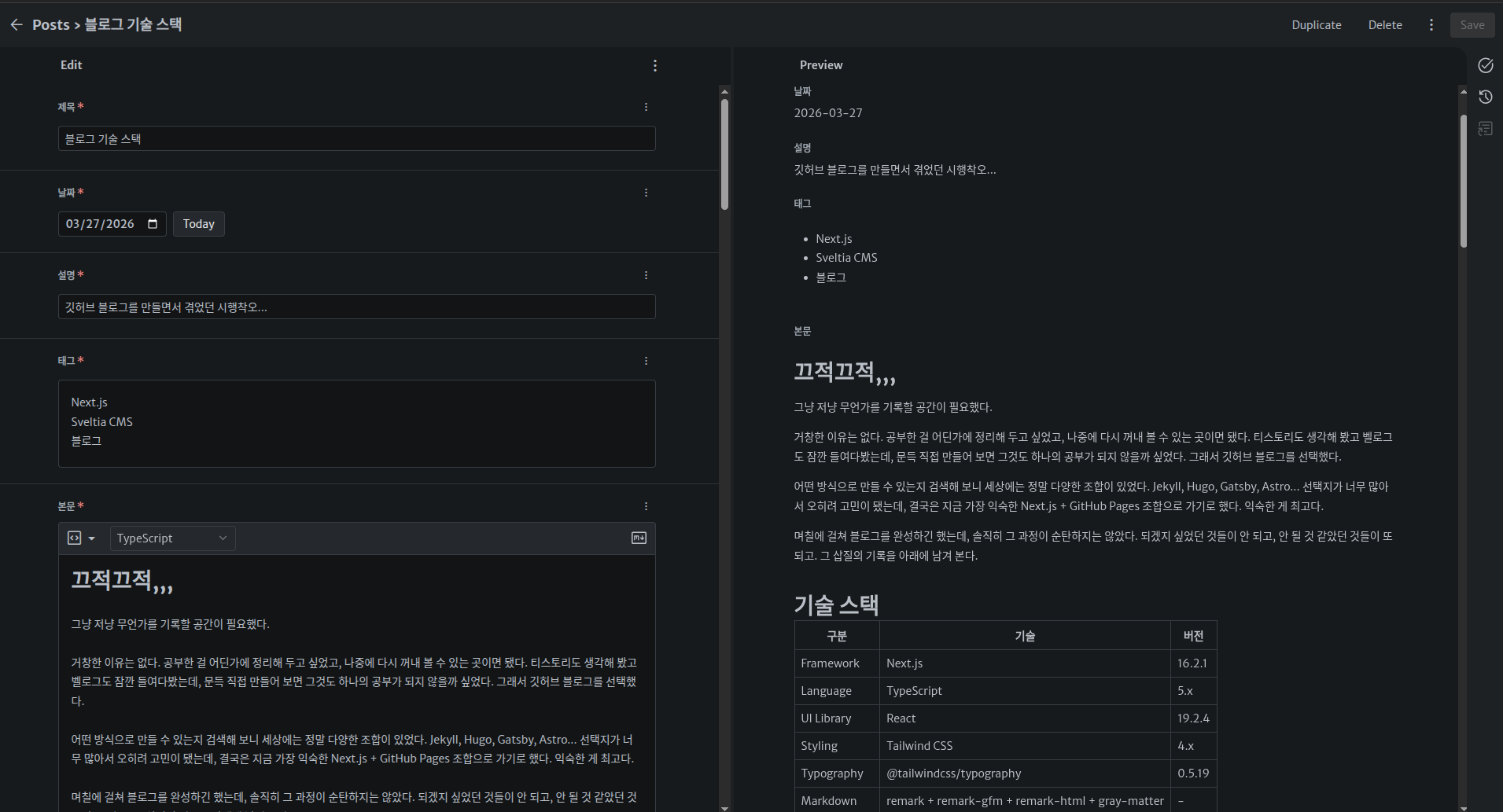
Here's the actual editing screen in Sveltia CMS. You write markdown on the left and see a live preview on the right.
CI/CD: GitHub Actions
The deployment pipeline is set up with GitHub Actions. It automatically builds and deploys to GitHub Pages on every push to the main branch.
# .github/workflows/deploy.yml
jobs:
  build:
    steps:
      - npm ci
      - npm run build        # → generates static files in ./out/
      - upload-pages-artifact # → uploads to GitHub Pages
  deploy:
    - deploy-pages           # → deploy
When you write a post in the CMS, it creates a commit on GitHub, which automatically triggers build and deploy. You can write and publish posts from the browser without doing anything locally.
Project Structure
├── src/
│   ├── app/                    # Next.js App Router
│   │   ├── layout.tsx          # Root layout (Header + Footer)
│   │   ├── page.tsx            # Homepage
│   │   ├── posts/[slug]/       # Post detail page
│   │   ├── tags/               # Tag list / filter by tag
│   │   └── about/              # About page
│   ├── components/             # UI components
│   │   ├── Header.tsx          # Top navigation
│   │   ├── Sidebar.tsx         # Sidebar layout
│   │   ├── ProfileCard.tsx     # Profile card
│   │   ├── PostCard.tsx        # Post list card
│   │   ├── TagNav.tsx          # Tag filter (client)
│   │   ├── TableOfContents.tsx # Table of contents (Intersection Observer)
│   │   └── HomeContent.tsx     # Home content (client)
│   └── lib/
│       ├── posts.ts            # Markdown parsing and post data
│       └── formatDate.ts       # Korean date formatting
├── posts/                      # Markdown post files
├── public/admin/               # Sveltia CMS
└── .github/workflows/          # GitHub Actions deployment
Summary
| Problem | Solution |
|---|---|
| Asset loading failure on static site | basePath + assetPrefix config |
| Markdown body styling | @tailwindcss/typography prose class |
| Dark mode as default | dark class on html + @custom-variant |
| Markdown table not rendering | Added remark-gfm plugin |
| Missing URL preview on link share | metadataBase + openGraph config |
| Decap CMS OAuth failure | Switched to Sveltia CMS + Cloudflare Workers |
| CMS post writing to auto deploy | Sveltia CMS -> GitHub commit -> Actions -> Pages |
Most of the trouble came from "GitHub Pages sub-path deployment" and "CMS authentication." The CMS authentication in particular was hard to solve with just the official docs -- I had to try multiple approaches to find the right combination.
URL Preview Issue When Sharing Links
When sharing blog links, the URL preview only showed the domain (jinwonmin.github.io) instead of the full path. The cause was that Next.js's metadataBase wasn't set, so the Open Graph meta tag (og:url) wasn't being generated properly.
I fixed it by adding metadataBase and openGraph settings to the metadata in layout.tsx.
export const metadata: Metadata = {
  metadataBase: new URL("https://jinwonmin.github.io/minsnote.github.io"),
  openGraph: {
    type: "website",
    siteName: "minsnote",
    locale: "ko_KR",
  },
};
Just like the basePath issue, when deploying to a GitHub Pages sub-path, you have to pay attention to every URL-related setting.